

Getting a Microsoft Fabric App running is relatively straightforward. Getting it deployed automatically, consistently, and across multiple environments is a different story.
You can develop Fabric Apps locally, version-control your code in GitHub, and deploy it to Fabric workspaces. So naturally, the next step is to bring everything together with GitHub Actions and build a proper CI/CD pipeline.
Imagine a workflow where:
- Developers build and test applications locally.
- GitHub serves as the single source of truth for application code.
- GitHub Actions validates every change and authenticates to Microsoft Fabric using a service principal.
- Applications are deployed automatically to the appropriate Fabric workspace.
- Pull requests, branch protection, and environment approvals control the promotion of changes from DEV to PREPROD and eventually PROD.
No more relying on someone to remember which application to publish, which workspace to select, or whether the latest changes made it into the right environment.
Sounds straightforward, right?
Here's where things get interesting: Fabric App ownership.
Authentication is not necessarily the same as having permission to deploy. Even when a service principal successfully authenticates to Microsoft Fabric, the actual deployment operation can run into ownership-related restrictions. And suddenly, what looked like a straightforward GitHub Actions workflow becomes a much more interesting engineering problem.
In this article, we'll explore the challenges of automating deployments for Microsoft Fabric Apps, investigate the role of ownership and authentication, and examine the available approaches to building a reliable CI/CD lifecycle across Fabric workspaces.
How the CI/CD model works
Fabric Apps are built using the Rayfin SDK. Unlike some other Fabric items, Fabric Apps are not currently promoted through Fabric Git integration or Fabric deployment pipelines. Microsoft instead documents GitHub Actions as the deployment approach, although Fabric deployment pipelines already support Fabric Apps.
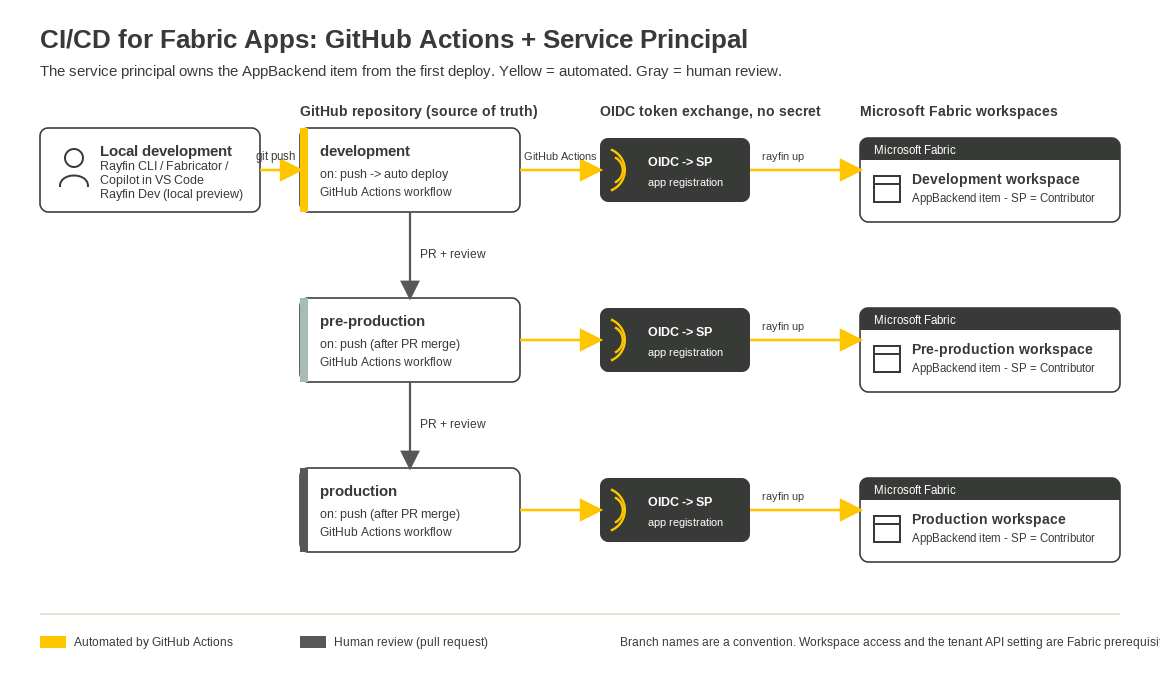
In this model, GitHub handles both sides of CI/CD. For continuous integration, the repository stores the application code and provides the controlled development history. For continuous deployment, a GitHub Actions workflow runs when changes reach a deployment branch. The workflow authenticates, installs the Rayfin CLI, validates and runs rayfin up against the target Fabric workspace.
A useful branch structure is:
| Git Branch | GitHub | Fabric Workspace | Deployment |
|---|---|---|---|
| development | Development | Development | Push |
| pre-production | Pre-production | Pre-production | PR merge |
| production | Production | Production | PR merge |
These branch names are a convention, not a Fabric requirement, and additional control can be obtained implementing feature branches from the development branch, but the important part is having a predictable mapping between branches, GitHub environments, and Fabric workspaces.
Authenticate deployments with a service principal
Automated deployments should run under a service principal rather than an individual developer account. Microsoft's documented Fabric Apps example uses a client secret with rayfin login --service-principal. The Rayfin login documentation also supports an ambient RAYFIN_TOKEN, which makes a secretless workflow possible, and with OpenID Connect (OIDC), GitHub requests a short-lived identity token (recommended) instead of storing a long-lived Azure client secret. The azure/login action supports OpenID Connect, and Azure federated credentials can restrict which repository, branch, or GitHub environment is allowed to authenticate.
For a Fabric-only deployment, an Azure subscription ID is not required. The deployment ultimately targets a Fabric workspace through rayfin up --workspace-id.
Before deploying, make sure:
- The service principal has Contributor or higher access to each target workspace.
- The Fabric tenant setting Service principals can call Fabric public APIs is enabled for the appropriate security group.
- The target workspaces already exist.
- The Fabric Apps workload is enabled in the tenant.
The ownership issue you should solve first
This is probably the easiest part of the setup to overlook. Fabric items have owners. If a developer manually publishes the application first, that human identity can become the owner of the resulting item, and Microsoft's item ownership documentation states that ownership takeover does not cover takeover as a service principal. For Fabric Apps, this can surface during automated deployment as an error similar to the popular:
403 Forbidden: Only AppBackend artifact owner can perform this operation
Current community reports show this behavior specifically with AppBackend items. This is consistent with Microsoft's documented ownership restrictions, although Microsoft does not document every AppBackend ownership scenario as a universal rule.
The safest deployment pattern is therefore simple:
Let the service principal perform the first deployment and be the owner since the beginning.
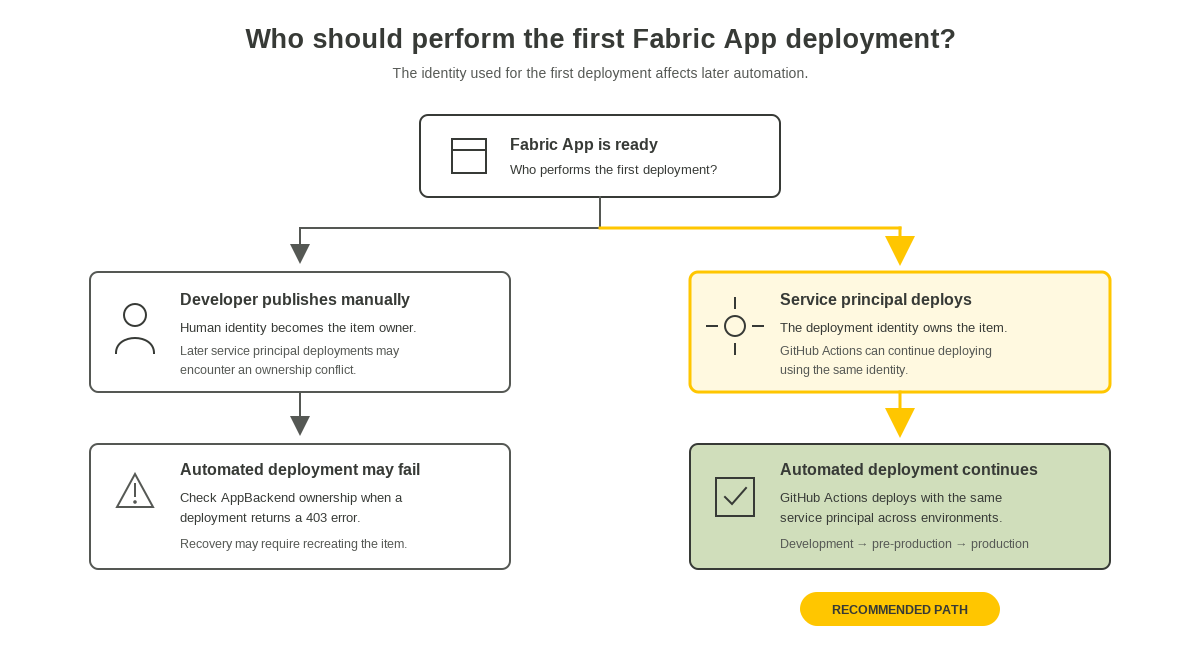
Developers can build and preview the application locally, but they should avoid manually publishing the deployable application under their own identity.
If an application is already owned by a human and the service principal cannot update it, the practical workaround is usually to delete the application and let the automated pipeline recreate it under the service principal, and make sure to allow some time for the deleted item to clear before retrying or manually delete it from the recycle bin.
CI/CD architecture
The deployment flow should look like this:
General implementation steps
The following is a baseline for CI/CD implementation using GitHub.
1. Create the application
Create the Fabric App using the Rayfin CLI or Copilot-assisted development in VS Code. Fabricator can also provide a convenient local development experience, but it is a community project rather than an officially supported Microsoft product.
Keep the application code in GitHub from the beginning. If you use Fabricator, this is done automatically; otherwise, create it yourself or ask Copilot do it.
2. Create your deployment branches
Rename main to development if that matches your workflow, then create the other branches according to your convention, such as:
- pre-production
- production
3. Add the GitHub Actions workflow
Create the YAML file under:
- .github/workflows/
Configure it to deploy when changes reach the corresponding branches.
4. Configure GitHub environments
Create a GitHub environment for each deployment target and configure the variables referenced by the workflow, such as:
- TENANT_ID
- CLIENT_ID
- WORKSPACE_ID
Keep variables and secrets consistent with what the YAML actually references.
5. Configure federated identities
Create Azure federated credentials that allow the appropriate GitHub repository and environments to authenticate as the service principal.
6. Develop locally
Make changes locally and preview the application before pushing. When the changes are ready, push to development. GitHub Actions handles the deployment to the development workspace, and configured this way, will use the Service Principal since the beginning, which is intentional and recommended.
7. Promote to pre-production
Create a pull request from development into pre-production. Once reviewed and merged, the push to pre-production triggers its deployment automatically, again using the Service Principal.
8. Promote to production
Once ready, use the same PR-based process to move tested code into production.
9. Protect deployment branches
For additional protection, you can use GitHub branch protection or rulesets to block direct changes to pre-production and production. Also, you can also require reviewers before a pull request is merged or before a GitHub environment allows deployment.
Troubleshooting
Many errors can arise as you are developing and testing the CI/CD configuration, but the ones below are the most common ones.
| Symptom | Likely cause | What to check |
|---|---|---|
| 403 forbidden on deploy | The item is owned by a human, not the deploying identity. | Check the AppBackend owner. If you deploy manually, take ownership from the item's About tab. If the SP deploys and a human owns it, delete the app and let the pipeline recreate it under the SP, then wait for the cache to clear. |
| Not all values/variables included | Secrets and variables are mixed, or set on the wrong scope. | Match each name the YAML reads to the right scope (environment vs repository, secret vs variable). |
| Access or auth errors | SP lacks workspace access, or the tenant API setting is off. | Give the SP Contributor or higher on the target workspace, and confirm "Service principals can call Fabric public APIs" is on for its security group. |
| Other validation or deploy errors | Many possible causes. | Run rayfin up --dry-run to validate locally, read the Actions log, and let Copilot or your agent inspect the repo and propose a fix. |
Closing thoughts
Automating Fabric App deployment with GitHub Actions is relatively straightforward once authentication, workspace permissions, and ownership are configured correctly.
The ownership decision deserves attention before the first deployment. If developers publish manually and become the owners of the AppBackend item, later service-principal deployments can become difficult to recover. Letting the deployment identity create the item from the beginning keeps the deployment path consistent.
From there, GitHub becomes the control point. Developers test locally and push to development. Pull requests promote tested code into pre-production and production, while GitHub Actions performs the actual Fabric deployment under a controlled identity.
That gives you a deployment process developers can follow without manually publishing applications or changing ownership between environments.