OneLake catalog or Microsoft Purview? Picking your Data Governance tool in Microsoft Fabric
Roberto
Hernández
Jiménez
October 22, 2026
•
10 min
Ventagium
What is Data Governance?
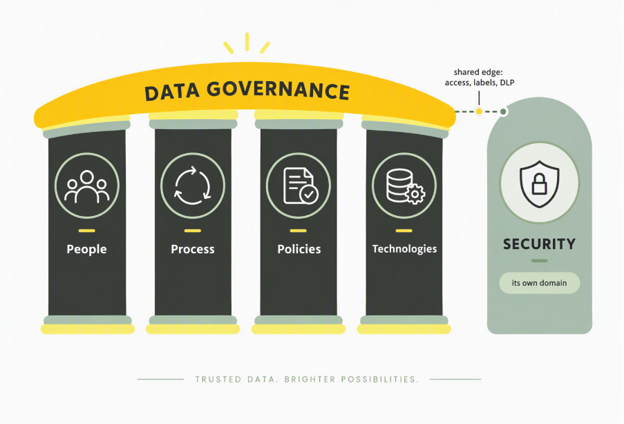
Data governance is how an organization keeps its data trustworthy, well described, and usable for decisions. A simple way to structure it is around four pillars: People, Process, Policies, and Technologies. People own and steward the data. Process defines the repeatable workflows that keep it healthy. Policies set the rules for how datais classified and handled. Technologies are the platforms that make the firstthree operational at scale, including catalogs, lineage tooling, and qualitymonitoring 1.
One deliberate choice in our framework: we treat Security as its own domain, separate from data governance. Security (identity, network protection, encryption, threat detection) is essential, and it deserves dedicated attention rather than being folded into a governance checklist. Governance answers "can people find and trust this data, and is it handled correctly," while security answers "is the environment itself protected." Keeping them apart avoids diluting either one.
Figure 1: Ventagium's data governance framework rests on four pillars, with Securitytreated as its own adjacent domain rather than folded into governance.
What are common Data Governance elements?
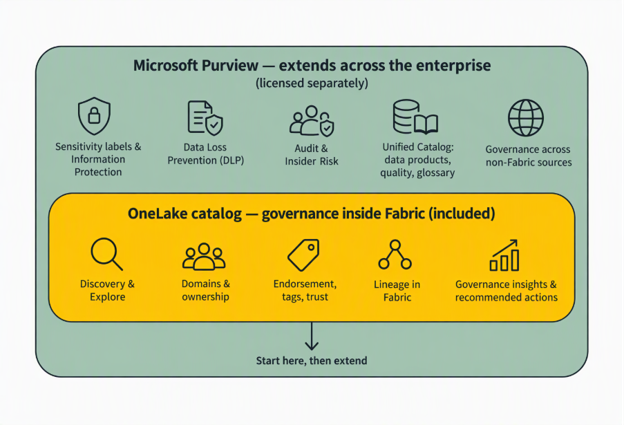
Each pillar breaks down into practical elements that a Fabric team runs day to day. The useful mental model is two layers. One Lake catalog governs inside Fabric and comes with your capacity. It is the central Fabric experience for discovering data, reading governance status, and managing security, organized into three tabs: Explore, Govern, and Secure2. Microsoft Purview wraps around that to add information protection, data loss prevention, audit, risk, and enterprise cataloging that spans sources outside Fabric. Many of these Purview capabilities require additional licensing 34.
Figure 2: OneLakecatalog covers governance inside Fabric and comes with your capacity; MicrosoftPurview wraps around it to extend protection, compliance, and cataloging acrossthe wider estate.
The table below maps each element to what each tool actually contributes. Related elements are grouped where they overlap heavily (classification sits with labels and protection, because in Purview asensitivity label both classifies and protects).
Governance Element
OneLake Catalog Contributes
Microsoft Purview Contributes
Data discovery & cataloging
Find and inventory assets so people and agents locate what exists.
Explore tab searches and browses Fabric items with filters, item details, and permissions; it is permission-scoped, so you see only what you can access; embedded in Teams, Excel, and Copilot Studio.
25
Unified Catalog and Data Map catalog metadata across Fabric plus non-Fabric sources (other clouds, on-premises) for estate-wide discovery.
3
Domains & ownership
Group data by business area and assign owners.
Fabric domains and subdomains group workspaces by business unit; a domain selector scopes the catalog; owners are assigned per domain.
4
Governance domains, data products, and a business glossary carry ownership across the whole estate.
Tags, endorsement & trust
Signal which assets are reliable and reusable.
Endorsement (Promoted and Certified) plus admin-defined tags, surfaced and prioritized in search.
4
Certification of governed assets and curation inside data products across sources.
Classification, labels & protection
Identify sensitive data and apply protection that travels with it.
Applies Purview sensitivity labels natively on Fabric items (default labels, inheritance) and reports label coverage.
4
Information Protection defines and auto-applies sensitivity labels; protection persists on supported export paths. Requires Purview licensing.
34
Data quality
Measure accuracy and track data health.
Engineering tests, semantic models, and operational monitoring inside Fabric; no dedicated row-level quality scoring service.
Unified Catalog data quality rules and health management, metered by compute (DGPU).
Sharing & collaboration / DLP
Share safely and stop risky sharing of sensitive data.
External data sharing plus OneLake security at item, folder, row, and column level.
Data lineage
Trace data flow from source to report and see change impact.
Lineage view with impact analysis across Fabric items.
4
Lineage across Fabric and connected sources for an enterprise view.
Auditing entitlements & access
See who can access what, and investigate activity.
Secure tab unifies workspace roles and OneLake security roles, so admins audit permissions and manage roles from one place.
2
Purview Audit logs all Fabric user activity; Insider Risk Management adds Fabric risk indicators for investigations.
3
Metadata scanning
Programmatically extract metadata to catalog and report on it.
Fabric scanner APIs extract item name, owner, sensitivity label, tags, and endorsement; no special license, works on non-Premium workspaces.
4
Scans Fabric into Data Map and Unified Catalog (live view, in preview) to publish item-level metadata estate-wide.
4
The pattern is clear. For anything that lives and is consumed inside Fabric, OneLake catalog already covers it. Purview earns its place when classification enforcement, DLP, audit depth, or cross-sourcecataloging become requirements.
How much does One Lake Catalog and Purview Cost?
This is where the two tools differ the most. One Lake catalog is part of Microsoft Fabric. If you have a Fabric capacity, you have the catalog, including Explore, Govern, and Secure, at no separate charge. Metadata scanning via the scanner APIs also requires no special license 4.
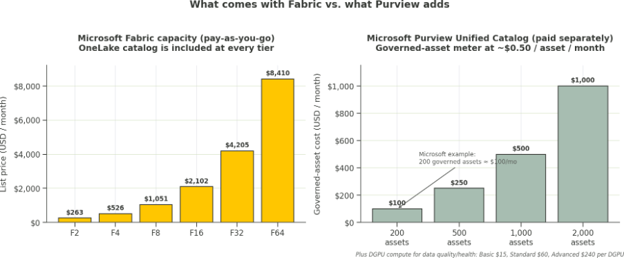
Fabric itself is billed on capacity (F-SKUs measured in Capacity Units), not per user. Pay-as-you-go runs from F2 at about $262.80per month up to F64 at about $8,409.60 per month, with roughly 41%savings on a one-year reservation. One Lake storage is billed separately at around $0.023 per GB per month 6.
Microsoft Purview is paid separately, and its model took effect on January 6, 2025 as pay-as-you-go. For Fabric governance you care about two layers:
Per-user licensing for the information protection and compliance capabilities: these ship in Microsoft 365 E5 at $60 per user per month, or via the Purview Suite add-on at $12 per user per month for organizations already on E3 7.
Consumption meters for Unified Catalog. You pay for governed assets at roughly $0.0165 per asset per day (about $0.50 per asset per month), and for Data Governance Processing Units (DGPU) when you run data quality and health jobs: Basic $15, Standard $60, Advanced $240 per DGPU, where one DGPU is 60 minutes of compute 9.
The important nuance: scanning assets into the Data Map is free. You only pay once an asset is linked to a governance concept such as a data product or a critical data element. Microsoft's own example is 200governed assets costing about $100 per month. So you can scan thousands of assets for discovery and pay only for the subset you actively govern 9. To use pay-as-you-go, you need an Azure subscription and a resource group in the same tenant as Purview 9.
Figure 3: What comes with Fabric versus what Purview adds. One Lake catalog rides on the Fabric capacity you already buy; Purview's Unified Catalog bills per governed asset plus compute for quality jobs.
How can we start implementing Data Governance in Fabric?
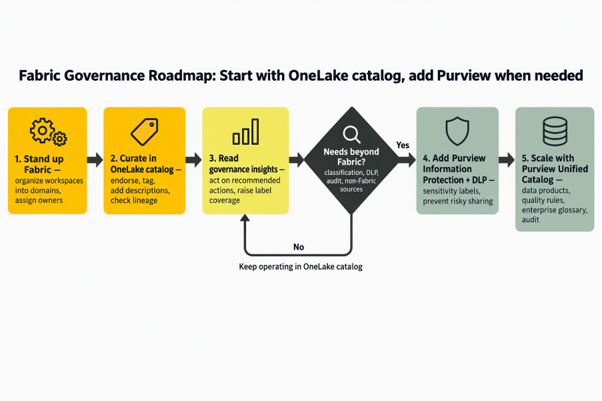
The right sequence is to establish Fabric governance first, then escalate to Purview against specific requirements rather than buying everything up front.
Stand up Fabric and structure it. Organize workspaces into domains by business area and assign domain owners. This single step makes the catalog's domain filtering useful and sets ownership boundaries 4.
Curate in One Lake catalog. In the Explore tab, add item descriptions, apply tand endorse trusted items (Promoted, then Certified for vetted content). Check lineage on key items so downstream impact is visible 4 11.
Read governance insights and act. The Govern tab shows Governance Health, insights, and recommended actions such as raising sensitivity-label coverage or setting missing domains. Work the recommendations and use the Secure tab to audit workspace and One Lake security roles 24.
Decision point: do needs extend beyond Fabric? If you require enforced classification, DLP on sensitive data, deep audit for compliance, or cataloging of non-Fabric sources, continue. If not, keep operating in One Lake catalog.
Add Purview Information Protection and DLP, then scale with Unified Catalog. Turn on sensitivity labels and DLP policies for Fabric item types, route Fabric activity into Purview Audit, and register Fabric into the Data Map so data products, quality rules, and an enterprise glossary sit on top 3.
Figure 4: A practical sequence. Establish Fabricstructure, curate and act on insights in OneLake catalog, then bring in Purviewonce needs extend to classification, DLP, audit, or sources outside Fabric.
Conclusion
The roadmap above leads to a more useful question thansimply choosing between two products: how far can you take governance withOneLake catalog before you need Microsoft Purview?
Scenario A: A small analytics team working entirelyinside Fabric. A few workspaces, internal dashboards, no regulated data.Domains, endorsement, tags, lineage, and the Secure tab give this teameverything it needs. Buying Purview here would add cost without solving a realproblem. Stay on OneLake catalog 2.
Scenario B: A consulting or product team handling USclient data. Analytics live in Fabric, but some datasets carry sensitiveclient information and contracts require handling controls and audit trails.Start in OneLake catalog for discovery and ownership, then add PurviewInformation Protection to label and protect sensitive items, DLP tostop risky sharing, and Purview Audit for the activity log. You governinside Fabric and pay Purview only for the protected, governed subset 3.
Scenario C: A regulated enterprise with data acrossFabric and other platforms. Data sits in Fabric plus Snowflake, on-premisesdatabases, and other clouds, with formal data-quality expectations and abusiness glossary. OneLake catalog remains the Fabric-native layer, and PurviewUnified Catalog and Data Map become the connective tissue: data products,quality rules (DGPU-metered), enterprise lineage, and cross-sourceclassification 9.
So, which tool? For Fabric, begin with OneLake catalog,because it is included and already covers discovery, domains, endorsement,tags, lineage, metadata scanning, and access review inside Fabric. AddMicrosoft Purview when a concrete requirement pushes past Fabric, such asenforced sensitivity labels, DLP, compliance-grade audit, or cataloging sourcesthat Fabric does not own. They are two layers of one approach, and theeconomics reward starting inside Fabric and extending only where the value isclear.
References
What is Data Governance, Databricks (general framing) 1


.png)