Microsoft Fabric Security: Beyond Permissions, Toward an Enterprise Security Architecture
Roberto
Hernández
Jiménez
November 13, 2026
•
13 min
Microsoft Fabric
On This Page
Microsoft Fabric brings data engineering, warehousing, real-time analytics, and Power BI together on a unified SaaS platform. This simplifies how organizations work with data, but it also concentrates data, analytical models, pipelines, notebooks, reports, and administration in the same environment.
Fabric includes controls for authentication, permissions, data protection, networking, monitoring, and governance. Microsoft services such as Entra ID, Purview, Key Vault, Defender, and Sentinel can extend those controls when an organization needs broader governance, isolation, or security operations capabilities.
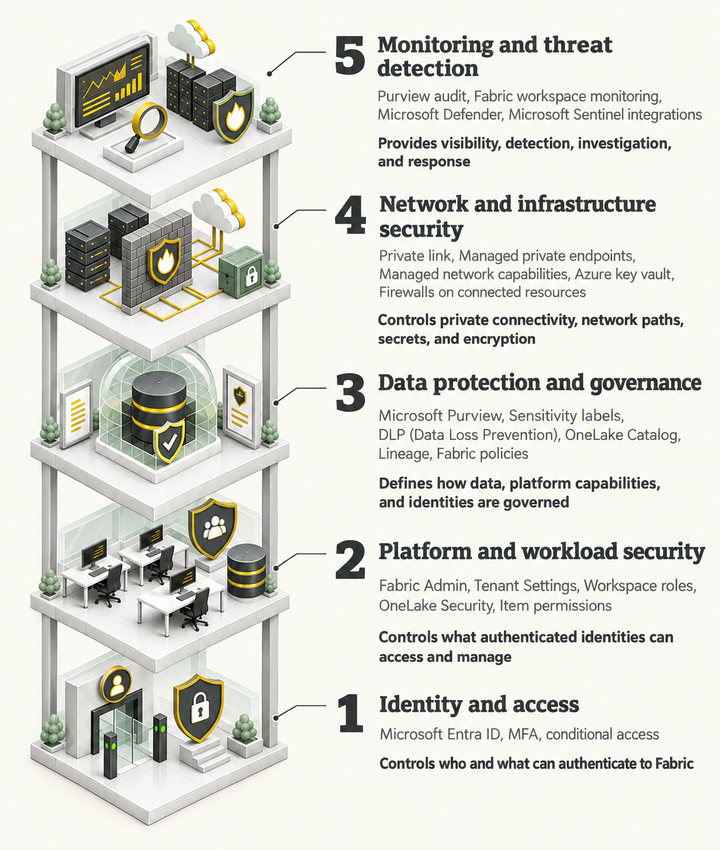
A practical way to organize and implement these capabilities is through a five-layer security model. This model provides an architectural framework for understanding how Fabric-native controls and complementary Microsoft services work together.
A five-layer security model for Fabric
1. Identity and access
Identity is the starting point. Fabric uses Microsoft Entra ID to authenticate requests. Organizations can also apply Conditional Access and Multi-Factor Authentication (MFA) to interactive users. Authentication establishes who is accessing the platform, while authorization determines what that identity can access and do.
This layer also includes service principals. A service principal is an application identity that can authenticate an application or automation process without requiring an interactive user session. In supported Fabric workloads and APIs, service principals can reduce dependence on individual user credentials for automated provisioning, applications, pipelines, and background services.
Support is not universal. Each workload or API should be checked individually. Fabric documents service-principal support for areas such as Warehouse REST APIs, selected public APIs, admin APIs, workspace creation, connections, and deployment pipelines, subject to the relevant tenant settings and permission model.
2. Platform and workload security
After an identity is authenticated, Fabric determines what it can do.
Fabric administrators manage organization-wide settings, while workspace roles and item permissions control access to workspaces and individual Fabric items. These permissions form the foundation of Fabric's control plane security, governing actions such as creating, managing, sharing, and configuring platform resources.
OneLake Security extends this model to the data plane, providing granular, role-based access control over data stored in OneLake. Administrators can define security roles that grant access to specific folders, tables, or schemas, and apply row-level security (RLS) and column-level security (CLS) to supported tables. These controls help organizations implement least-privilege access and protect sensitive data consistently across supported Fabric compute engines.
An important distinction is that OneLake Security complements rather than replaces workspace permissions. Users with elevated workspace roles, such as Admins, Members, and Contributors, already have broad data access and are not restricted by OneLake Security roles in the same way as Viewers or users with read-only item permissions. Supported item types and permissions should also be verified before designing the access model.
Together, these Fabric-native controls establish the foundation for securing the platform, managing workloads, and enforcing access to the underlying data.
3. Data protection and governance
Access control answers who can reach data. Governance determines how data and platform capabilities should be managed.
Fabric Policies, currently in preview, allow administrators to centrally define and enforce granular governance rules. Policies can evaluate conditions such as workspaces, security groups, item types, workspace settings, and sensitivity labels, depending on the specific policy type. They support tenant-level and capacity-level administrative scopes. Current documented policy areas include external data sharing, item creation, and editing selected workspace settings.
Fabric Policies should therefore be treated as governance and security guardrails, not as a replacement for workspace permissions, OneLake Security, or Purview controls. Their available policy types, scopes, regional support, and preview limitations should be reviewed before adoption.
Governance also extends beyond data assets and platform configurations to the identities that operate Fabric. Service principals belong primarily to identity and access, but their ownership, permitted use, credential or certificate lifecycle, workspace access, and least-privilege permissions require governance. Microsoft documentation confirms that service-principal access depends on tenant settings, security groups, workspace or item permissions, and, for Warehouse data access, data-plane permissions.
4. Network and infrastructure security
Some organizations require tighter control over how Fabric communicates with users and external systems.
Fabric supports tenant-level and workspace-level Private Link, along with managed private endpoints and managed virtual networks for supported scenarios. Private Link protects inbound connectivity to Fabric, while managed private endpoints provide private outbound connectivity from supported Fabric workloads to external data sources. Managed virtual networks provide network isolation for supported workloads and scenarios.
Azure Key Vault can support customer-managed-key scenarios for supported Fabric workspaces and items, providing organizations with greater control over encryption keys. It can also manage secrets for surrounding Azure components, such as applications and integration services. These controls protect connections and supporting Azure resources around Fabric. They do not turn Fabric into a conventional customer-managed Azure resource.
5. Monitoring and threat detection
Security requires visibility into activity and operational health.
Fabric user activities are available through Microsoft Purview Audit, providing visibility into user and administrative actions for auditing and investigation.
Workspace monitoring (currently in preview) can collect logs and metrics from supported Fabric items and centralize telemetry from multiple workspaces. This provides operational visibility and supports investigation, analysis, and alerting. Telemetry availability depends on the supported item types and activities.
Audit scope should be understood carefully. Microsoft notes that the Fabric audit log is not a complete source for OneLake data-plane activity. For visibility into data access through OneLake APIs, OneLake diagnostics may also be required. Fabric audit logs remain relevant for OneLake control-plane activities, such as changes to security roles, sharing, and shortcuts.
Microsoft Defender for Cloud Apps can add session controls and activity detections for supported Power BI scenarios. Microsoft Sentinel can centralize security data when the required connectors or integrations are configured.
How the layers fit together
Fabric Security Layers
Security layer
Representative mechanisms
Role in the model
Identity and access
Entra ID, MFA, Conditional Access, service principals for supported workloads and APIs
The central point is simple: Fabric supports every layer, but one product does not provide every control. Some controls are native to Fabric. Others come from Microsoft services that integrate with the platform.
Together, these layers provide a framework for securing identities, platform resources, data, network connections, and security operations. The five-layer model describes what an organization should address; the implementation roadmap describes how to progressively establish and mature those capabilities.
How to Secure Microsoft Fabric?
A maturity-based implementation roadmap
A small Fabric environment does not necessarily need the same security architecture as a multinational organization handling regulated data.
A better approach is to start with the controls that provide the most immediate protection and extend the architecture as requirements grow. The following stages provide a practical progression rather than a fixed set of requirements.
Foundational
Establish a controlled baseline:
Entra ID authentication and MFA
Restricted and controlled Fabric administration
Group-based workspace roles
Basic Conditional Access
Audit collection
Initial sensitivity labels
An inventory of existing automation identities and user-owned connections
Managed
As Fabric expands across teams:
Regular access reviews
More granular OneLake permissions
Microsoft Purview governance and DLP
Fabric Policies, after validating preview scope and availability
Centralized monitoring
Governed service principals for supported automation
Named ownership and least-privilege permissions for non-human identities
This is the appropriate stage to move suitable automation away from personal user accounts. The change should be based on confirmed support for the specific workload or API.
Advanced
For sensitive or regulated environments:
Tenant-level or workspace-level Private Link
Managed private endpoints
Controlled outbound connectivity
Customer-managed keys where justified and supported
Broader adoption of applicable policy controls
Expanded monitoring and threat detection
Stronger protection of service-principal credentials
Optimized
At higher maturity:
Continuous access and ownership reviews
Automated alerting and response
Service-principal lifecycle and credential-rotation controls
Policy and permission changes managed through controlled deployment processes
Expiring security exceptions
Repeatable compliance evidence
The objective is to apply the controls that match the organization’s risk, scale, and operating model, while continuously improving their effectiveness.
What might this look like in practice?
These scenarios are illustrative rather than fixed maturity classifications. The appropriate security architecture depends on an organization's data sensitivity, regulatory obligations, operational complexity, and risk exposure, not simply its size.
Small organization
A company with a few workspaces may rely on Entra ID, MFA, group-based workspace roles, OneLake permissions, sensitivity labels, and auditing.
If unattended automation is required and the workload supports it, a governed service principal can avoid tying the process to one employee’s account.
Enterprise multi-workspace environment
An organization with multiple business domains needs consistent governance.
OneLake Security can provide granular data access. Fabric Policies can add centrally enforced guardrails for supported operations. Purview can standardize classification and DLP. Service principals should have documented owners, scoped permissions, managed credentials, and periodic review.
Highly regulated organization
A regulated organization may require more extensive controls across all five layers, depending on its compliance obligations and risk assessment.
Private connectivity, customer-managed keys, detailed data-access controls, Purview governance, Fabric Policies, governed service principals, workspace monitoring, and centralized security operations can work together to provide stronger control and evidence for reviews.
Conclusion
Fabric provides a strong security foundation, but its controls should be treated as part of a broader architecture.
Start with identity, administration, permissions, and auditing. Add Fabric Policies where their current preview scope matches the governance requirement. Use service principals for supported non-interactive scenarios, while governing them with the same care applied to privileged human identities.
Purview, private networking, Key Vault, Defender, and Sentinel should be introduced when risk, scale, or compliance requirements justify them. Ultimately, securing Fabric is not a one-time configuration exercise. It requires continuous governance, access reviews, monitoring, and improvement as the platform and organizational requirements evolve.